Search This Blog

Showing posts with label Jira. Show all posts

Tuesday, 1 March 2016

Draining the meeting bogs and how not to suffer from email overload (part 4)


This is the fourth (and probably last) in my series of blog posts about how we unknowingly often let our IT determine how we communicate, and what to do about it.

Teams need to communicate at three different speeds: Tomes, Task Tracking and Information Ping-pong. When we don’t have the right IT support to for all three, things go wrong. This week I'm writing about Task Tracking.

I lose my luggage a lot. Domestic, international, first world, developing nations; I’ve had travel issues in more places than most people get to in their lives. I’ve even had airlines locate my lost luggage and then lose it again in the process of delivering it back to me.

Two of the more recent lost luggage events stood out by how they were handled:

  • On one occasion, a senior member of staff apologised to me in person, and promised that it he would have his staff on to it immediately; 
  • On the other, a bored probably-recent graduate took my details, mumbled the official airline apology and gave me a reference number in case I had a query about where it was up to.

I felt much more confident about the mumble from the junior than the eloquence of the senior.

Why?

Because there was a reference number. The reference number told me:

  • There was a process that was being followed. It might be a very ad-hoc process; it might often fail, but that's clearly better than the alternative.
  • If the team leader is micro-managing the tasks of their staff, it's because they are choosing to do so. The process must have been done a few times before, so the staff know what to do.
  • The team leader will probably not be the bottleneck on stuff getting done. We've all seen it, or been there: the project manager who is painfully overworked while team members are idle (often unknown to the project manager).
  • The process will therefore scale somewhat. Staff can be empowered enough that the process could scale without a single-person bottleneck.
  • It told me that there was a team of people who work on finding lost luggage, and that someone in that team would be working on it.
  • If a whole flight-load of luggage had been lost, scaling up resources to help wouldn't have been impossible.
  •  It didn’t matter to me who was working on it; if I was wondering whether any work had been done, I would have logged into their portal and looked it up, and wasted no-one’s time or effort but my own.

Having the manager’s name and assurance gave me no such confidence, but instead the sure knowledge that if I called the manager, the manager would have to get back to me (i.e. go and query the staff member he had assigned). This process would have consumed staff time and effort; which meant that if a large number of people had lost their luggage and were all asking the same question, that there would be gridlock and thrashing (so many interruptions that nothing gets completed).

In your team, who is busier? The team leader / project manager, or the technical staff doing the work?

If someone needs something from your team, how is that work tracked? Do they have someone senior that they call, or can they find out what they want to know wasting no-one's time but their own?

In a sensible, well-run organisation the staff with more seniority should have more idle time than the staff who report to them. Otherwise, they are the bottleneck holding back the organisation's efficiency.

If this is happening, then something is wrong with the way ticket tracking is being done.

The most common ticket software systems tend to be helpdesks or service desks because the scale of such organisations usually make it essential It is almost impossible to live without them in software development once the software has reached the complexity experienced in a very minimal viable product.

But ticket-tracking can be done with almost any technical team inside or outside of IT. Here's my list of the minimum requirements for a ticket-tracking system to be useful:

DUAL FACING Ticket tracking systems convey two important pieces of information: that something is being worked on (or that it isn’t) and what tasks people are working on.

On the one hand, the system needs to be easy for end-users to see where their request is up to which is why tracking tasks in a private spreadsheet doesn't work.

The ticketing system should automate messages to requesters, create follow-up surveys when the ticket is resolved, and so on.

On the other hand, the ticketing systems needs to be fast and efficient for staff to update, or else staff will batch their updates in a large chunk at the end of the day or the end of the week. It also needs to provide reporting to management to provide a high-level overview.

ENUMERATED You want discussions to be about "LTS-203" not "the project to update the website branding" so that everyone is on the same page. The tracking system has to provide a short code that you can say over the telephone or in a conversation, and that usually means some kind of short string of letters (perhaps three or four, or a pronounceable syllable) followed by a number. If that number is 7 digits long, you have a problem, because no-one will remember it, nor be able to say it.

EMBEDDABLE Whatever you are using for your tomes and reporting, you want to be able to embed your ticket information into it, and have the status there automatically update. This makes project meetings smoother and more efficient, because you can embed the ticket into the minutes and quickly glance back to last week’s meeting notes to see what needs to be reviewed. If software projects are involved, then being able to embed ticket references into the revision control system is very helpful.

UNIVERSAL If the entire organisation can work off the same ticket tracking system, that is ideal. One client I worked with had numerous $100,000+ projects being blocked -- unable to be completed -- because another (unrelated) department had delayed some logistics for efficiency. It required months of investigation to uncover -- which should have been possible to identify by clicking through inter-team task dependencies.

ADAPTABLE In order to be universal, the workflow needs to be customisable per team and often per project. For some teams, To-Do, In Progress and Done are sufficient to describe where the work is up to. For others, there can be a 20-step process involving multiple review points. ITIL projects often end up clunky and barely useable because the One Universal Process for all Incidents is really only necessary for a handful of teams, and the rest are forced to follow it.

LOCK-FREE When a project is urgent you will have more than one person updating a ticket at the same time. This isn't the 1980s any more: it's silly and inefficient for one user to lock a ticket and leave someone else idle, unable to write. Time gets lost, and more often than not, the update gets lost as well.

PREDICTIVE We live in an era of deep-dive data mining. It's no longer acceptable to say to a customer or user "we have no idea how long this is going to take" any more than an advertising company could say "we don't know how much money to spend on your campaign". And yet, I still see helpdesks logging tickets and giving no indication to their user base of when to expect the ticket to be resolved. At the very least, make sure your ticketing system uses my three rules of thumb. Or better still, make sure it works with my Automated Estimator of Effort and Duration to get the best real-time predictions.


That seems to be the most important seven criteria.

  • Spreadsheets don't work, and yet I still see them used in almost every organisation.
  • Most startups use Jira or Basecamp. Basecamp also includes capabilities for Tomes and Information Ping Pong. 
  • Best Practical's RT is the most mature of the open source tools (even though it doesn't meet some criteria). Trac is another commonly-used open source tool, particularly when it is bundled with software repository hosting.
  • Large enterprises often use HPE Service Manager (which is less popular than it was in the past and is being replaced by Service Anywhere), ServiceNow (who took a lot of HPE's marketshare) and BMC Remedy. They are generally 10x - 100x the price of Jira but are designed to work better in highly siloed organisations.

Be aware that if the nature of someone’s job is that they will work on the same problem for months or years -- for example, a scientific researcher -- there’s probably little value in ticket tracking because there would be so little information to put in there. Likewise, if someone’s job is to do hundreds of tasks per day, then any ticket tracking will have to be automated by inference from the actions or else the overhead of the tracking system might make it impractical.


I'm hoping to put this (and many other thoughts) together in a book (current working title: "Bimodal, Trimodal, Devops and Tossing it over the Fence: a better practices guide to supporting software") -- sign up for updates about the book here:  http://eepurl.com/bMYBC5

If you like this series -- and care about making organisations run better with better tools -- you'll probably find my automated estimator of effort and duration very interesting.

Greg Baker (gregb@ifost.org.au) is a consultant, author, developer and start-up advisor. His recent projects include a plug-in for Jira Service Desk which lets helpdesk staff tell their users how long a task will take and a wet-weather information system for school sports.

Tuesday, 16 February 2016

Draining the meeting bogs and how not to suffer from email overload (part 2)

This is the second in my series of blog posts about how we unknowingly often let our IT determine how we communicate, and what to do about it.

Teams need to communicate at three different speeds: Tomes, Task Tracking and Information Ping-pong. When we don't have the right IT support to for all three, things go wrong.

In this post, I'll talk about team communication by Tomes.

Tomes are documents that answer "Who are we? What do we do? How did we get here? Why are we doing this?"

These are often important things to say, but they aren't particularly urgent. They might or might not be read by people inside the team. Quite often they are read by people outside of the team, but often weeks or months after they were written.

Examples include:
  • Project decisions
  • Strategic plans
  • Frequently asked questions
  • Status reports for long, ongoing projects 
  • Minutes of meetings
  • Discussions about any of the above

These are often tedious to write, and the task is often given to the person with the most free time using whatever tools are at hand. Generally, this means either email or MS-Word documents. There are serious flaws with both of these. Writing emails just contributes to the email overload problem. Writing a Word document and putting into a fileshare (or on to Sharepoint) leads to more meetings because it won't get read. Emailing a Word document around (which is probably the most common approach) manages to be the worst of both worlds.

I've made an attempt at distilling the 5 requirements for a tool to support Tomes. If you can think of more, let me know.

NAME MENTIONING If someone is mentioned in a Tome they need to be notified automatically. This keeps everyone on the same page (virtually). A common miscommunication I've seen is where everyone was expecting a response or involvement from someone outside of the team -- but the individual was never aware that they were supposed to be doing anything. Automatic notification mitigates this.

TASK ASSIGNMENT AND DUE If a task is mentioned in a Tome, it should be easy to assign it to someone and to give it a due-by date. The task should automatically appear on that person's to-do list. Otherwise, it is too easy for the task to get lost.

LIVE TASK STATUS When someone marks off a task as completed from their to-do list, this should be reflected automatically in the Tome. If a task has a lifecycle (e.g. it has to be reviewed by another team before it can be marked off as "Done"), then the live status of the task should appear.

This saves time in meetings working out whether something has been done or not. One of the most frustrating meetings I can remember (and I've had a few) is was a pointless nothing-to-report meeting: everyone admitted in the meeting that they hadn't had time to do anything and that there was nothing to report. This could have been trivially seen by the project manager who convened the meeting if he had been able to see the lack of progress on the task list of the minutes of the previous meeting.

IN-PAGE COMMENTS Comments about the Tome should appear with the tome. It should be easy to discuss and have a conversation about any part of the Tome.

CHANGE TRACKING AND WATCHING It should be easy to change the Tome. If it is changed, then it should be easy to see what changed even though the Tome displays the latest version by default. It should be possible to register an interest in changes to the Tome and get notified when this happens.


These seem obvious, and seems like a reasonably complete list.

  • Email can do #1 (you can CC someone outside your team). If you are using Outlook you can drag the email into your todo list (and Gmail can do something roughly equivalent), so that satisfies #2. But #3 and #5 are impossible, and #4 by email is a recipe for giving everyone a full inbox that just gets dumped.
  • Word documents in a portal or fileshare do #1 very poorly; #2 is even worse. #3 is impossible, but does OK on #4 or #5.
  • Slightly more innovative companies will use Google Docs. The collaborators list can act as #1, and it does as well on #4 and #5 as a Word document does. #2 and #3 are sort-of possible if the tasks are put into a Google Sheets document instead, but it is rather fragile, complex to set up and means that there are multiple documents for the one event or topic.
  • Startups often use Confluence. It nails all 5 requirements very well.


So what usually happens?

In large, traditional organisations, I see teams with Word documents being emailed around by a project manager, a deluge of emails (CC'ed to everyone the project manager sent the project tracking document to) and then meetings at least once a week so that everyone can work out whether or not they were supposed to have done something, and why that probably wasn't a high priority anyway.

Smaller organisations manage better, although the ones that try to do this with Google Docs tend to be very chaotic, and have someone always complaining about how they really haven't got their procedures and processes sorted out yet.

We think this mess is normal, but it's just driven by the software we use to intermediate our communications.

The next post in the series will hopefully be next Tuesday.

I'm hoping to put this (and many other thoughts) together in a book (current working title: "Bimodal, Trimodal, Devops and Tossing it over the Fence: a better practices guide to supporting software") -- sign up for updates about the book here:  http://eepurl.com/bMYBC5

If you like this series -- and care about making organisations run better with better tools -- you'll probably find my automated estimator of effort and duration very interesting.


Greg Baker (
gregb@ifost.org.auis a consultant, author, developer and start-up advisor. His recent projects include a plug-in for Jira Service Desk which lets helpdesk staff tell their users how long a task will take and a wet-weather information system for school sports.

Tuesday, 9 February 2016

Draining the meeting bogs and how not to suffer from email overload (part 1)


Some meetings are important; sometimes face-to-face is the best way to work through an issue. And email is a necessary business tool. But in many of the organisations I work with, I've seen meetings and emails used as a crutch because their staff aren't given what they need in order to work more efficiently.

I blame IT for this, perhaps too harshly, but IT should be thinking both about how individuals communicate, and also about the requirements for teams to communicate.

In general, there are three broad ways that teams communicate:
  • With Tomes that answer "Who are we? What do we do? How did we get here? Why are we doing this?"
  • Using different ways to say "We're working on it"
  • By playing Information Ping-pong


To be efficient, it's important that staff from outside the team can "lurk" (watch what is going on) without engaging the team across all three methods.

If other staff can't lurk -- they will either email you or ask for a meeting.

What I see all too often is desperate staff, who are over-worked because they are forced to use email and meetings -- tools which are very ill-suited to all three speeds of communication.

I'll discuss each of them in follow-up blog posts; I'll schedule them for Tuesday each week unless something else more interesting crops up.

I'm hoping to put this together in a book (current working title: "Bimodal, Trimodal, Devops and Tossing it over the Fence: a better practices guide to supporting software") -- sign up for updates about the book here:  http://eepurl.com/bMYBC5

If you like this series -- and care about making organisations run better with better tools -- you'll probably find my automated estimator of effort and duration very interesting.


Greg Baker (gregb@ifost.org.auis a consultant, author, developer and start-up advisor. His recent projects include a plug-in for Jira Service Desk which lets helpdesk staff tell their users how long a task will take and a wet-weather information system for school sports.
Tuesday, 24 November 2015

Three rules of thumb that say "this job is going to take ages"

As you might know, I've written a robot called AEED which looks at work tickets and predicts how long that job is going to take. I designed it to solve the black-hole problem of service desks: instead of "we'll get back to you", it's "your request will take around 4 days". If you happen to run JIRA in the Atlassian cloud (here's the marketplace link) or HP Service Manager it's definitely worth a look.

As it turns out, it's also giving surprisingly good predictions for software development and other kinds of projects too.

Anyway, some fun: now I've got some comprehensive data across a good number of organisations.

Rule of Thumb #1: Each hand-off adds about a week. 


Initially I didn't believe this: whenever I've done any sysadmin work if someone ever assigned a ticket to me and it's not something I could do anything about, I would just pass it on to someone more appropriate as soon as I saw it -- a few minutes at most.

But that's not quite it, is it? The ticket sits in your queue for a while before you get to it. Then you second guess yourself to wonder whether it really might be something you are supposed to handle and waste a bit of time investigating, during which time you will get interrupted by something more high priority, and so on. Then you might need some time to research who it is supposed to go to.

I've seen numbers as low as 4 days per re-assignment in some organisations, stretching up to two weeks for others.

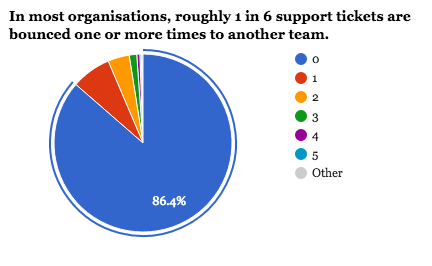
What percentage of tickets that have been re-assigned in the past are correctly re-assigned this time?


Whenever an organisation gets bigger than Dunbar's Number, the mis-assignment rate starts shooting up (as can get re-assigned absurdly large numbers of times, as in the chart above). Which makes sense: no longer does anyone know what everyone is doing. (I've got a long-ish presentation about this).

Implications: 

  • Do you know exactly who is going to do this task? If not, add a week at least.
  • Is your organisation so large that it takes time just to find the right person? If so, sign-up to the next beta of AEED. 


Rule of Thumb #2: Meetings slow things down.


I didn't expect that just having the word "MEETING" appearing in a JIRA ticket would be a signal for a long duration. But, wow does it ever make a difference: 8-10 standard deviations of difference in how long the ticket will take!

The actual effect is often only a few days extra, but it's a very, very definite effect.

Some people might interpret this as saying "don't have meetings, meetings are bad". I don't think this is what is going on here; if a customer or tech is writing a work ticket and mentions a meeting, it probably means that the issue really can't be resolved without a meeting. If an INTP or INTJ computer geek says that a meeting is required, it's very unlikely that they are having a meeting for the sake of having a meeting.

But, any meeting has to fit into everyone's work schedules, and that can introduce delays.

Implications:

  • Do you need to meet anyone in order to complete this job? Add a few days.
  • This is the kind of thing that AEED tells you. Install it now while we're still in beta and not charging for it.

Rule of Thumb #3. Not much gets done on Wednesday

I was digging for data that showed that Friday afternoon is the worst time to raise a helpdesk ticket because everyone would be slacking off. It turns out not to be the case at all: in all the organisations I've got, everyone is more-or-less conscientious. Perhaps they make a Friday afternoon ticket a top priority for Monday, or otherwise make up for lost time.

But Wednesday? It's not true in every organisation, but it was there for quite a few.

I can only guess why. My guess it that people have less time on Wednesdays because they are called into meetings more. Nobody would organise a meeting for a Friday afternoon if they can avoid it; likewise Monday morning is often avoided. But need to call a meeting on a Wednesday? No problem!

Does anyone have any data on this? Maybe Meekan or x.ai might know, or anyone from the Google Calendar team? Or does anyone have any good suggestions of the Wednesday effect?

Implications:

  • Assume you have a 4.5 day week. Pretend that Wednesday is a half day, because that's about all the work you will get done on it.


Greg Baker (gregb@ifost.org.auis a consultant, author, developer and start-up advisor. His recent projects include aplug-in for Jira Service Desk which lets helpdesk staff tell their users how long a task will take and a wet-weather information system for school sports.

Wednesday, 11 November 2015

An Atlassian story

A little while back I was talking with two Daves.
  • Dave #1 is the CIO of a college / micro-university
  • Dave #2 is on the board of a small airline. 
Because I tend to get involved in non-traditional projects, they often ask me what I'm working on, probably out of amusement more than anything else. At the time I was building a service catalog for Atlassian (and now I have an awesome plug-in on their marketplace).

Neither had any idea of who Atlassian is or what it does, which was no surprise to me. I don't quite understand why an Australian company with $200m+ in revenue and a market cap in the billions which isn't a miner, telco or bank isn't memorable.

Still, the tools Atlassian makes are mostly used by software developers, and my circle of friends and acquaintances doesn't include many coders so "Atlassian makes the software to help people make software" isn't a good way of describing what they do.

Other than a brief stint at Google, I haven't been a full-time employee or even long-term contractor in any normal company this century, so instead I talked about what's unusual and different at Atlassian based on all the other organisations I've worked with. I talked about how the very common assumptions about the technologies to co-ordinate a business are quite different here.

Type of communication Corporate default
(aka "what most companies do")
What is generally done at Atlassian
Individual-to-individual Email or talk over coffee. HipChat @ the individual in a room related to the topic
Individual-to-group Teleconference / webinar, for all matters big or small. A comment in the HipChat room. Or sometimes Google Hangouts and HipChat video conference if it's something long and important.
Reporting (project status, financials) Excel document or similar Confluence status page or JIRA board
Proposal Word document or Powerpoint presentation Confluence page
Feedback on proposals Private conversation with the person who proposed it, or maybe on another forum page somewhere else on their sharepoint portal. The discussion in the comments section of the confluence page.

And yeah, my secret superpower is to be able to narrate HTML tables in speakable form. There was a lot of "on the one hand... on the other hand at Atlassian..."

Note that the Atlassian column is all public and searchable (in line with being an open company), and the "default corporate column" is not. Also, in the Atlassian column, you opt-in to the information source; in the "traditional company" column, the sender of the information chooses who to share it with.

Why is this interesting? Because the Atlassian technologies and the Atlassian way of doing things is an immune system against office politics.

In order to get really nasty office politics, you really need an information asymmetry: managers need to be able to withhold information from other managers in order to get pet projects and favourite people promoted, and for others to be dragged down by releasing information at the worst possible moment when the other party can't prepare for it. (Experience and being middle-aged: you see far too much which you wish you hadn't.) When information is shared only with the people you choose to share it with, that's easy to do.

At Atlassian, it's not quite like that. Sure, there are still arguments and disagreements. Sometimes there is jostling for position and disagreements about direction and there are people and projects we want to see happen. And not every bad idea dies as quickly as it should. But because other interested parties can opt-in as required for their needs it's a very level playing field and ---

And that's where Dave #1 cut me off, shook my hand and said, "Wow. Thank you. That's exactly it. That's EXACTLY it."

Dave #2 just nodded sagely. "Yes," he said, and then again more slowly: "yes."

Summary: Atlassian sell office-politics treatments.

Greg Baker (gregb@ifost.org.auis a consultant, author, developer and start-up advisor. His recent projects include a plug-in for Jira Service Desk which lets helpdesk staff tell their users how long a task will take and a wet-weather information system for school sports.